Most operators choose their pricing tool the same way they choose a mattress. They read a few reviews, pick the one with the best marketing, and live with the consequences for years. The consequences, in this case, are real money left on the table every single week.
Dynamic pricing tools are not interchangeable. PriceLabs, Wheelhouse, and Beyond Pricing have meaningfully different data models, different default behaviors, and different failure modes. Choosing without a structured evaluation is not saving time. It is outsourcing a critical revenue decision to whoever had the better Google ad.
Here is how to run an actual evaluation before you hand your calendar over to an algorithm.
Start With What the Tool Thinks Your Market Is
Every dynamic pricing tool builds a competitive set for your property. That comp set is the foundation of every price recommendation it makes. If the foundation is wrong, everything downstream is wrong.
Before you touch a single setting, ask the tool to show you what it is comparing your property against. In PriceLabs this is visible in the Market Dashboard. In Wheelhouse and Beyond it requires some digging. What you are looking for is whether the tool understands your actual competitive pressure. A three-bedroom villa in the hills outside Palma is not competing with a two-bedroom apartment in the port. If the comp set conflates those two, your pricing will be systematically off during peak season when the distinction matters most.
This is especially important in markets with hard geographic segmentation: the Algarve coast versus inland Alentejo, the northeast of Mallorca versus the southwest, the Chianti corridor versus Florence proper. Broad market tools sometimes smooth over these distinctions in ways that hurt outlier properties. If you cannot interrogate the comp set in the first week of a trial, that is a serious product limitation, not a minor UX issue.
The Questions to Ask Before You Trial Anything
A trial period reveals nothing if you go in without a framework. There are four questions that matter before you even connect a channel manager.
First: does the tool have genuine demand data for your specific market, or is it extrapolating from a nearby major city? This distinction matters enormously in secondary European markets. A tool with strong data in Barcelona may be guessing in Tarragona or Sitges. Ask support directly. The answer will tell you a lot about how honest the company is.
Second: what is the default behavior on orphan gaps? A one or two-night gap between reservations is one of the most common revenue leaks in the business. Some tools fill these aggressively with discounts. Others leave them at base rate and let them go dark. You need to know which behavior you are getting out of the box, because the default is what runs your business when you are not watching.
Third: how does the tool handle seasonality curves versus event spikes? Mallorca in July is baseline high demand. A major sailing regatta in the port is a spike on top of that. A tool that cannot separate those two signals will either under-price the regatta or over-price the weeks around it. Ask how the tool distinguishes structural seasonality from event-driven demand.
Fourth: what does the tool do with your historical data? If you are migrating from another tool or from manual pricing, you have a pricing history. Does the new tool ingest that, weight it, ignore it? The answer shapes how long it takes for the algorithm to understand your property’s actual booking patterns.
If you have not asked all four of these before starting a trial, you are not running an evaluation. You are running a longer version of reading reviews.
What the First 30 Days Should Actually Look Like
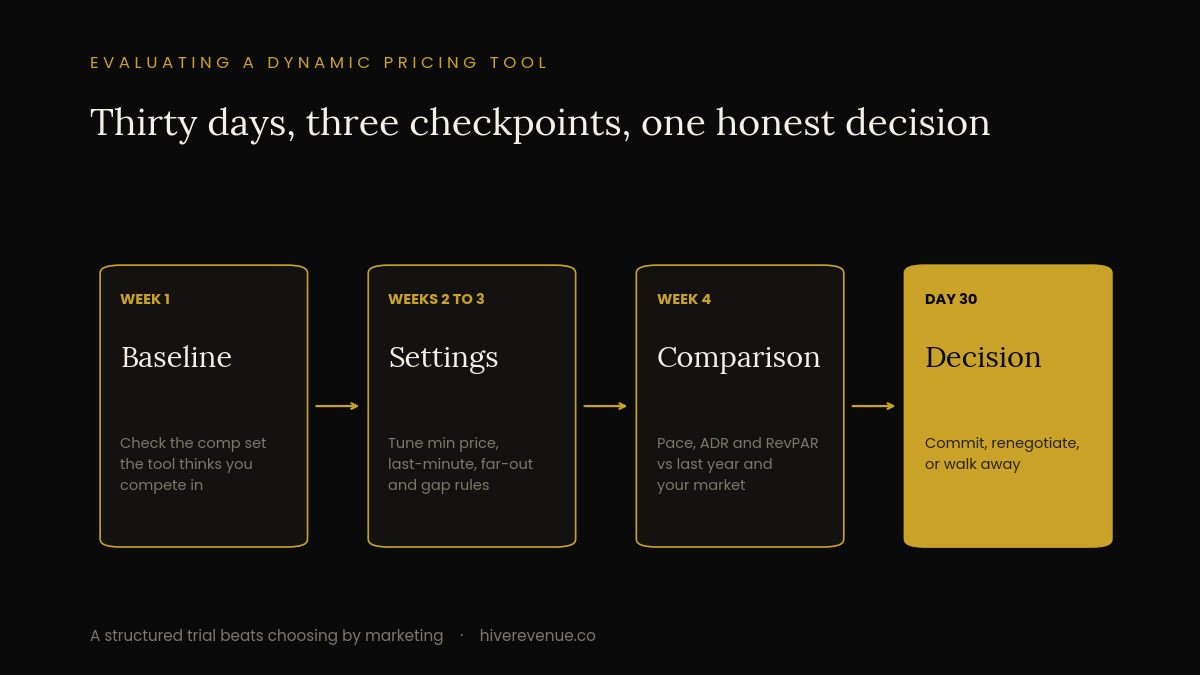
The trial period is not a passive observation. It is active stress-testing. There are specific things to watch in the first four weeks that will tell you whether to commit or move on.
Week One: Baseline Calibration
Connect the tool but do not let it push prices live yet. Review every recommendation it makes against what you would have priced manually. The gap between those two numbers is your calibration delta. If the tool is pricing your Ibiza villa at 180 euros on a Saturday in August, something is wrong with either the comp set, the base price, or both. Do not skip this step in the interest of getting things running faster.
Weeks Two and Three: The Settings That Actually Matter
Once you go live, the settings that govern your first 30 days are not the flashy ones. They are the floor, the minimum stay rules, and the last-minute discount curve. Getting these wrong is one of the most common and expensive mistakes operators make, and it happens quietly because the damage accumulates across dozens of small transactions rather than one obvious error.
Set your base price using your own data, not the tool’s suggestion. The tool’s suggested base is a starting point derived from comps. Your actual cost structure, occupancy targets, and positioning may differ significantly from those comps. In PriceLabs, override the base and set it from your own RevPAR history. In Wheelhouse, the base price calibration slider needs human input to behave correctly. In Beyond, the market-based pricing feature can drift your base upward in strong markets, which feels good until it kills your shoulder season fill rate.
Watch the last-minute discount settings closely. Most tools apply an automatic discount as the arrival date approaches. The logic is sound in theory. In practice, if you are in a high-demand market like Tuscany in June or the Costa del Sol in August, that discount is triggering on nights that would have filled at full rate. Know exactly when your tool starts discounting and at what percentage, because the defaults are almost always calibrated for average markets, not your market.
Week Four: The Honest Comparison
At 30 days, pull your numbers and compare RevPAR, not just occupancy. Occupancy is easy to inflate by pricing low. RevPAR is the honest number. Compare it against the same period last year if you have that data, or against your best manual pricing month as a proxy. If the tool has not improved RevPAR by week four, that is not a data issue, that is a fit issue. Either the tool is wrong for your market or you have not configured it correctly. Both are worth diagnosing before you sign an annual contract.
A deeper look at what a full revenue audit should cover is in the 42-point revenue audit framework. Pricing tool selection is one component. It is not the whole picture.
The Commitment Decision
After 30 days you should have a clear answer. The tool either understands your market, behaves intelligently by default, and gives you enough control to override when you know something it does not. Or it does not.
The most common mistake at this stage is committing to a tool because switching feels painful. That is backwards logic. The switching cost of a bad pricing tool is paid every month, in perpetuity. A migration to PriceLabs from Wheelhouse takes a weekend. Staying with the wrong tool because the migration is annoying costs you thousands in under-optimized nights over the course of a year.
If you are operating in Spain, understanding how the broader market dynamics interact with your tool’s recommendations matters as much as the tool settings themselves. The 2026 Spain STR market context is relevant here, particularly for operators in Barcelona or Catalonia where regulatory pressure is reshaping supply in ways that most pricing tools are not yet accounting for correctly.
Pricing tools are not a set-and-forget infrastructure decision. They require active management, especially in the first quarter of use. If your current tool has been running on default settings for more than 60 days, you have already made the commitment decision by inaction, and it is costing you.
Run a Real Pricing Audit Before Your Next High Season
The Hive Method Workbook includes the 42-point revenue audit, a direct booking readiness scorecard, and a 90-day execution plan. Just $45 — built for European STR operators running 1 to 10 properties.